Advantages of Online Payment: 6 Benefits for Your Firm
Online payment clears faster and cuts fraud, but for a firm that bills by invoice, the real win is connecting the payment to the invoice and the ledger. Here are the advantages.
.png)

Between coordinating teams, managing timelines, and keeping clients happy, getting paid should be easy.
So moving your firm from checks to online payment sounds like an obvious upgrade. The reality is less straightforward. Faster payments matter, but so does everything surrounding them: how you send invoices, how you record payments, and how much work your team still does after the money arrives.
That's why some firms switch to online payments and immediately save time, improve cash flow, and spend less effort on collections, while others end up with the same billing headaches in a different format.
This guide breaks down the advantages of online payment for firms that bill by invoice, where those benefits actually come from, and how to tell whether a digital payment setup will improve your process or simply replace paper checks with digital busywork.

Types of Online Payment for A&E Firms
When firms talk about "accepting online payments," they're often describing very different things. Some clients pay by ACH, others use cards, and some firms send a payment link attached to the invoice.
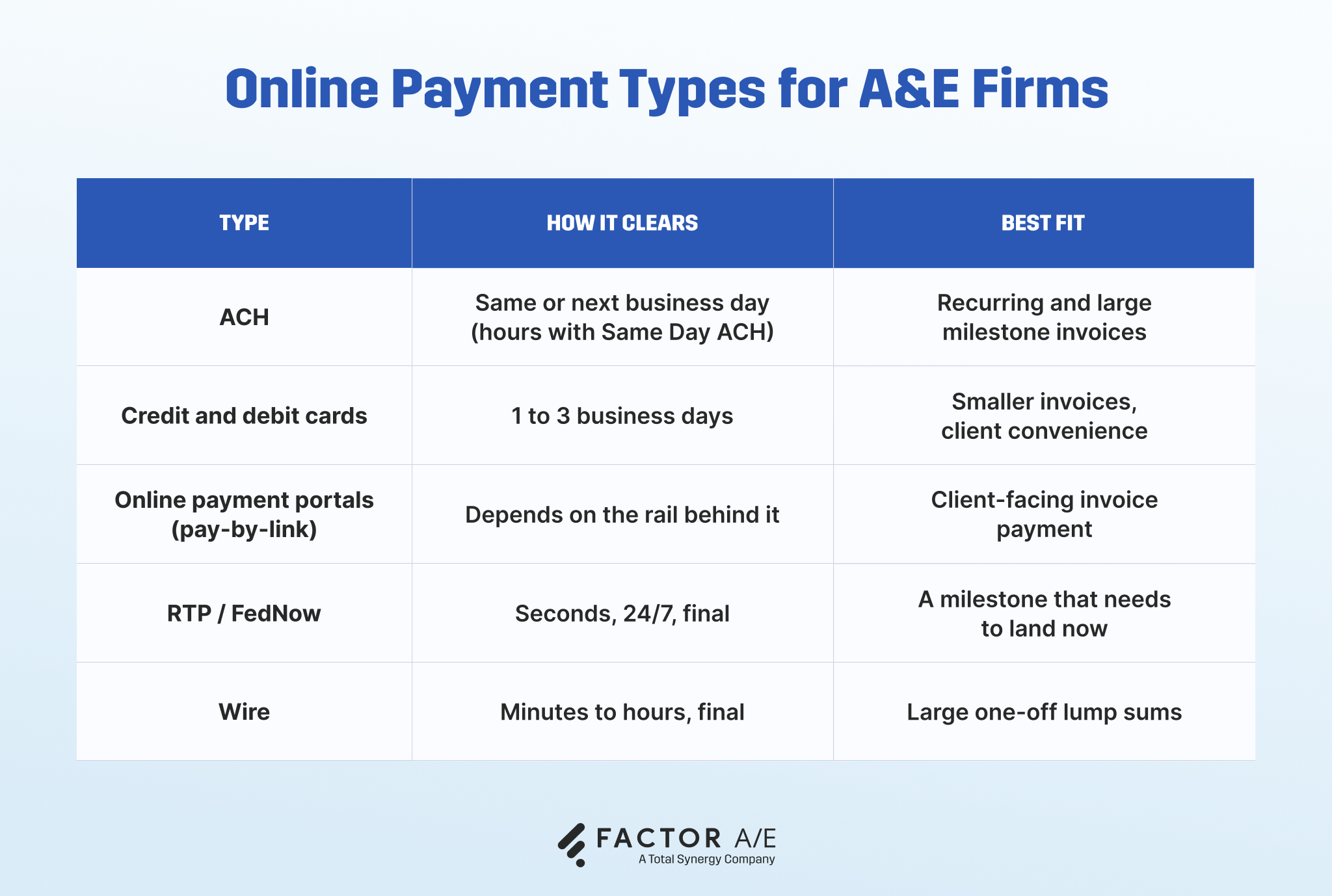
The payment method affects how quickly money arrives and what it costs to collect. What matters just as much is what happens afterward: whether the payment closes the invoice and updates the books, or creates another reconciliation task for someone on your team.
ACH transfers
ACH transfers move money directly between bank accounts. They carry low, flat fees and usually clear the same or next business day, which is why they're commonly used for recurring and higher-value milestone invoices. Same-Day ACH can shorten that timeline even further.
Credit and debit cards
Cards give clients a familiar way to pay and generally settle within one to three business days. Percentage-based fees become more noticeable as invoice amounts increase, so they're often better suited to smaller invoices or situations where convenience matters more than cost.
Online payment portals
A payment portal is the pay-by-link attached to a digital invoice. It lets clients pay as soon as they open the invoice, using the payment method linked to their account. Some portals simply collect the money. Others automatically connect the payment to the invoice and accounting records.
Real-time payments (RTP and FedNow)
Payments sent over RTP and FedNow settle within seconds, at any time of day. Because they're final once sent, they can be useful when timing is critical, and funds need to arrive immediately.
Wire transfers
Wire transfers are typically used for high-value, one-off payments. Like real-time payments, they are final once completed, though they usually incur higher transaction costs.
For A&E firms, ACH becomes the default for milestone invoices, with a payment link providing clients with additional payment options. The payment method matters, but the bigger consideration is what happens after the payment arrives. If someone still has to match deposits to invoices and update the books by hand, changing the rail hasn't made much difference.
Advantages of Online Payment for a Firm That Bills by Invoice
The benefits of online payment extend beyond getting money into the bank faster. They shape how much time your team spends on billing, how easily you can see what's outstanding, and how confidently you can make decisions using current information.
Get paid faster and steady your cash flow
Check float is the period when you've already covered project costs but haven't yet received the cash. A check extends that float, and someone's time gets spent following up on it. Electronic payments shorten processing time, and using ACH transfers means payments will clear the same or next business day.
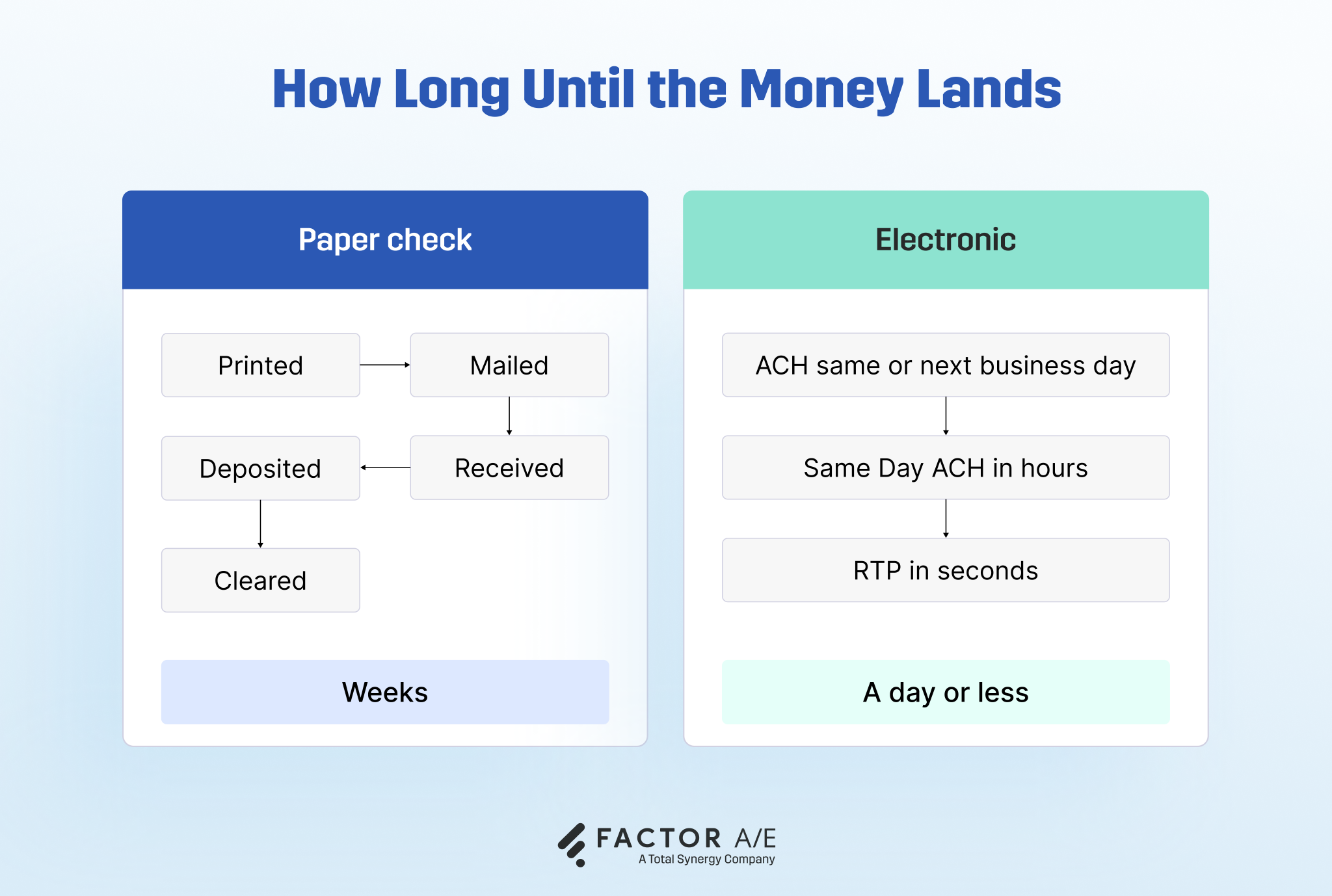
The gap between finishing work and getting paid depends on more than how the payment clears. It also depends on how quickly the invoice goes out.
Faster invoicing compounds the effect. After connecting billing to its accounting, Tarantino Engineering Consultants cut its invoicing timeline from a full week to a few days, accelerating both invoice delivery and collection. For the principal, that's the difference between guessing at the firm's cash position and knowing it.
Collect more, chase less
Getting paid faster is one side of it. The other is spending less time following up on money you've already invoiced. 55% of US B2B invoices were overdue in 2024, making collections work part of the billing process for many firms.
A payment link attached directly to the invoice won't eliminate late payments, but it removes one reason for delay.
Clients can pay from the invoice itself, without looking up bank details, requesting instructions, or setting the task aside for later.
Fewer steps between receiving an invoice and paying it can mean fewer reminders, fewer follow-up emails, and less time spent chasing what you're already owed.
Stop reconciling by hand
Manual reconciliation is a tax you pay every month. Payments come in, someone checks which invoice they belong to, records the transaction, updates the accounting system, and makes sure everything still ties out.
Processing an invoice by hand costs about $8.78, according to IOFM. With automation, that figure falls to as little as $1.77.
The difference is the matching work. When payments automatically post against the correct invoices and update accounting records, the manual steps disappear.
See who has paid without asking
Determining whether a specific invoice has been paid may involve checking the bank feed, scanning the inbox for confirmation, and, if needed, contacting the client to verify it.
A connected payment system centralizes that information and timestamps the process: sent, opened, paid, overdue.
Instead of piecing together receivables at month-end, the information is already there when you need it.
Cut the fraud risk that comes with checks
Checks remain the payment method most frequently targeted by fraud as 63% of organizations reported check fraud in 2024, and FinCEN has flagged hundreds of millions of dollars in mail-theft check fraud.

Electronic payments don't eliminate fraud entirely, but they reduce exposure to check-specific risks by removing paper checks from the mail stream.
When card payments are involved, providers also operate under standards such as PCI DSS 4.0.1, which governs how cardholder data is handled and protected.
How to Set Up Online Payment So It Connects to Your Billing
The benefits of online payment depend as much on setup as on the payment method itself. A disconnected process can leave you with the same reconciliation work in a different format. These four steps help you avoid that outcome.

Step 1: Decide whether it's worth it
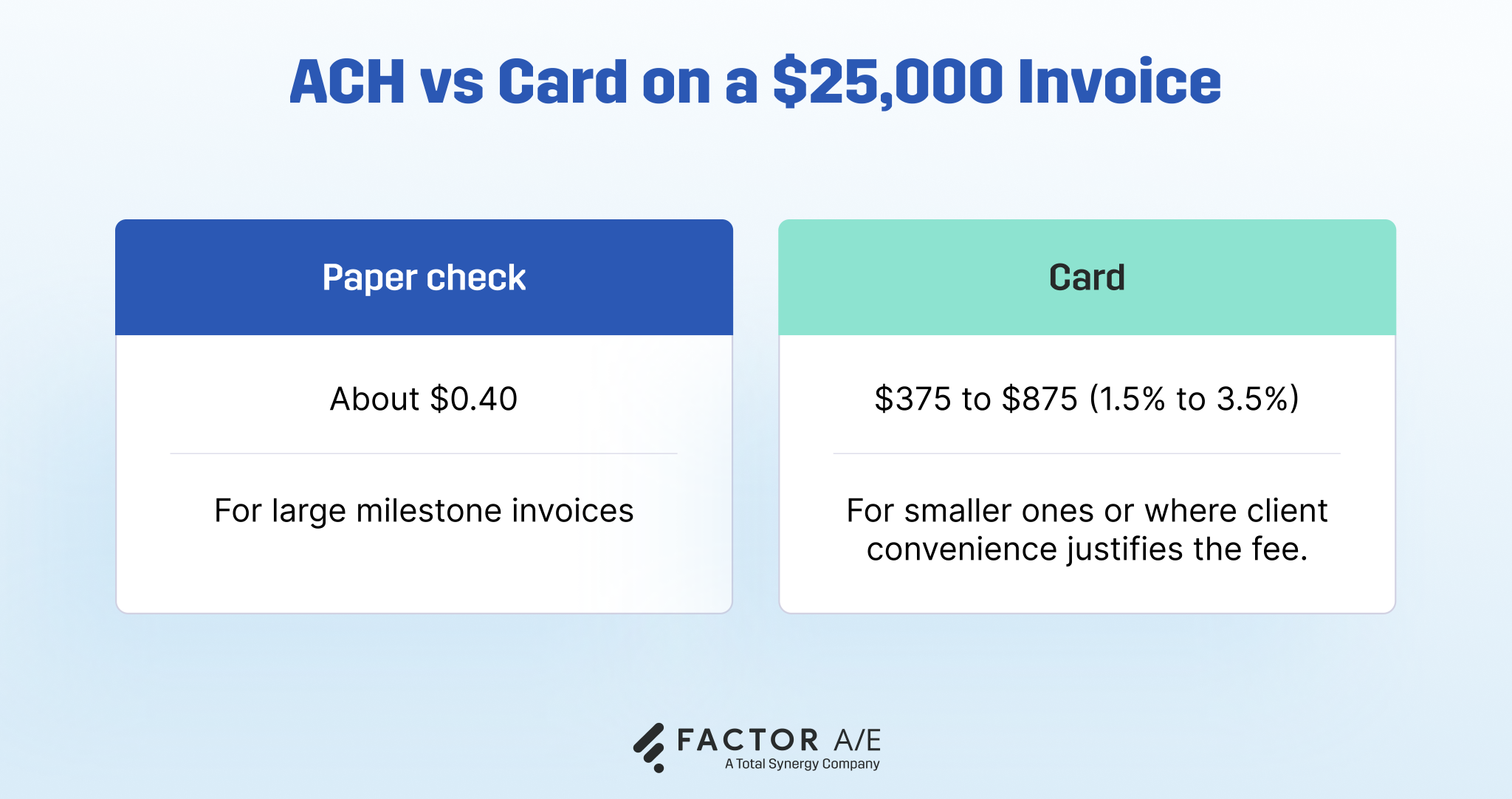
ACH incurs a flat fee of roughly $0.40 on a $25,000 milestone invoice, whereas a card at 1.5% to 3.5% would cost $375 to $875 on the same invoice.
For firms billing milestone invoices of $10,000 and up, ACH is almost always the default, and the fee math alone justifies the switch. For smaller monthly retainers across many clients, cards may be worth the percentage for the convenience.
Billing both, you can enable different methods per project. Chargebacks, a real concern in retail, are rare when billing contracted clients.
Step 2: Check what your billing system already does
Many firms assume moving to online payments means evaluating new vendors and managing another software implementation. Before you do, look at the system you're already using to send invoices.
Many billing platforms already include payment functionality that firms never switch on. In those cases, enabling online payments may be as simple as adjusting a few settings rather than undertaking a full migration project.
A small pilot usually tells you what you need to know. Turn it on for one or two clients, watch how the invoices, payments, and accounting entries behave over a billing cycle, and decide from there. You don't have to commit the entire firm before you know whether it works.
Step 3: Choose a payment that connects to your invoicing
This is the step that decides whether online payment actually helps. A standalone pay button collects the money but leaves you to match each payment to an invoice and post it to the books by hand.
Payment built into your invoicing does that for you: the payment posts, the invoice closes, and your books update without you having to touch anything. What matters is the principle, not the brand: choose a tool that closes the invoice and posts to the books on its own, not a processor that only collects the money.
FactorPay works this way: clients pay straight from the invoice, and payment status syncs to QuickBooks Online in real time, no manual entry.
You can enable it per project, so a client who insists on a check doesn't force the method across every engagement. After moving to a single connected system, Altura Architects now saves 15 to 20 hours per month on invoicing.
Step 4: Sync payments to your accounting
A two-way, real-time QuickBooks Online integration keeps invoices, bills, and payments in sync across systems, eliminating double entry. Fusion Design saw the payoff directly, saving over 16 hours a month on billing once everything ran in one place. When the books stay current on their own, the firm's numbers are right when you need them, for a pricing call or a staffing decision, instead of weeks behind.
Getting Paid Shouldn't Create More Work
The firms that benefit most from online payments aren't necessarily the ones using the newest payment methods. They're the ones that remove the work surrounding them.
When payments arrive already matched to invoices and reflected in the books, billing stops being a monthly cleanup exercise. Collections take less time. Reconciliation fades into the background. Leadership spends less time chasing information and more time using it.
Take a look at your current process. Where does someone re-enter information, manually match payments, or stop what they're doing to check whether an invoice has been paid? Those are the points where time and margin quietly leak out of the business.
If those friction points sound familiar, it's worth exploring whether a more integrated approach could simplify the behind-the-scenes work.
Check out Factor Pay with a free trial, or sign up for a demo to see how it can simplify billing and payments for your firm.

Frequently Asked Questions
What is online payment?
An online payment moves funds electronically between accounts, with no paper check or cash. For a firm, it usually means a client paying an invoice by ACH, card, or a pay-by-link instead of mailing a check.
What are the disadvantages of online payment?
The main trade-offs are processing fees, which are higher on cards than on ACH; the need for a reliable internet connection; and the security practices those systems require, primarily PCI DSS compliance and standard encryption. There's also a short adjustment period as the team and a few clients transition. For most invoice-billed firms, the cost of those trade-offs is smaller than the cost of slow, manual, check-based collection.
Is online payment safe?
Yes, when handled on compliant systems. Electronic payments use encryption and follow the current card data standard, PCI DSS 4.0.1, and they remove the mail-theft exposure that makes checks the most fraudulent payment method.


.avif)