
.png)


Getting a clear picture of what's actually happening with AI in civil engineering is trickier than it appears.
Most of what you hear in common dialogue hits one of two extremes. It’s either “AI is the future. Adapt now or get left behind,” or “AI regularly makes wrong calls and hallucinates, and anyone telling you to get on board now is fearmongering.”
The truth is somewhere in between.

Some use cases are unrealistic, and AI isn’t at a place to work autonomously within them (and perhaps never will be). In others, AI is already doing useful work on real projects.
In this article, we’ll explore four areas where AI is earning its place in civil engineering, not by replacing engineers’ judgment but by extending their ability to work effectively and efficiently.
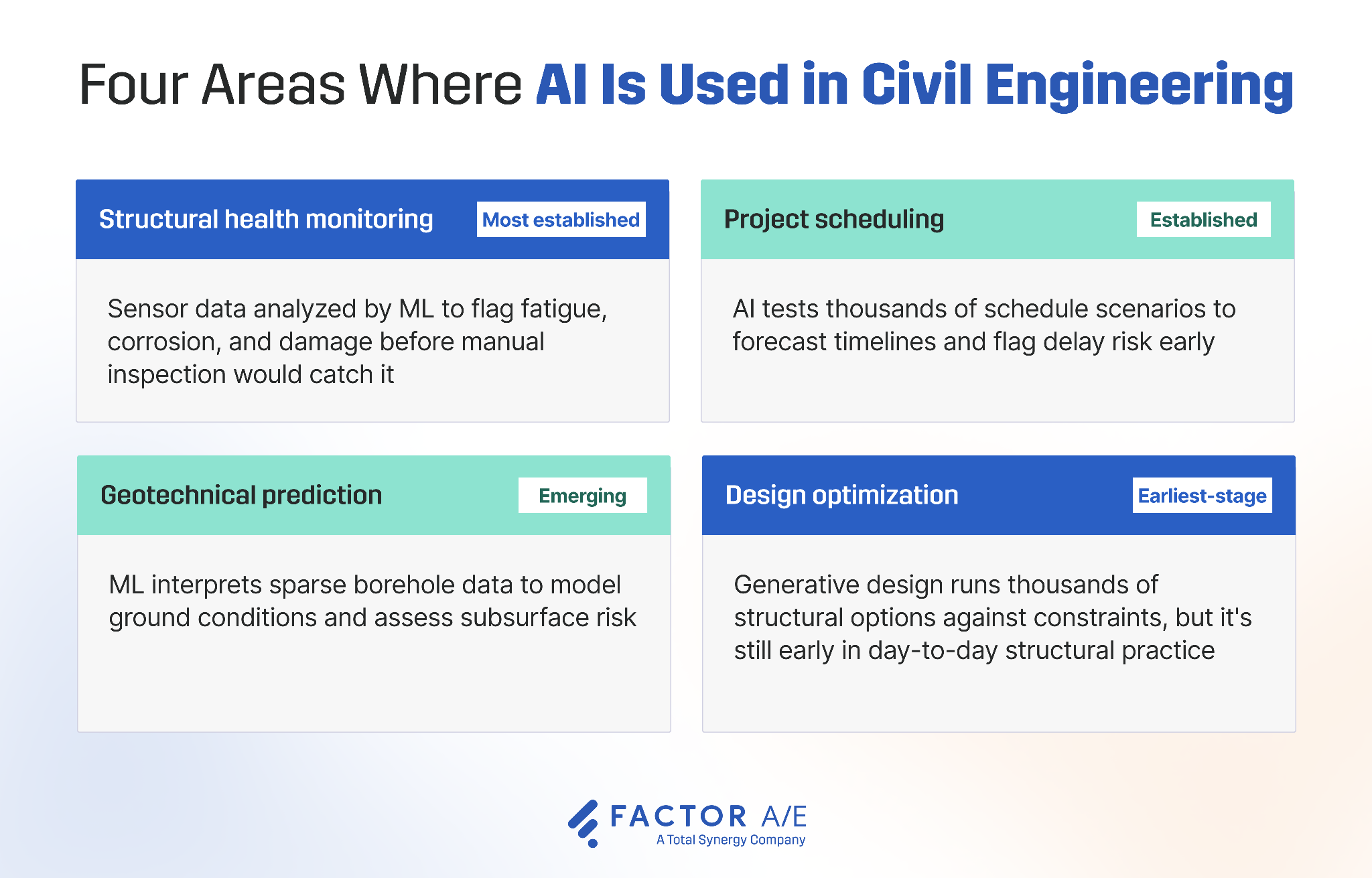
1. Structural Health Monitoring (SHM)
Major bridges, tunnels, and buildings are increasingly fitted with networks of sensors (e.g., accelerometers, strain gauges, fiber optics) that stream continuous data on how a structure is behaving.
In California, for instance, Caltrans and UC Berkeley developed BRACE2, a system that monitors bridges across the state highway network in real time and delivers rapid structural assessments after events like earthquakes, integrating real-time sensor data with structural models to produce metrics like stiffness and component damage for decision-makers.
The thing is, traditional monitoring is largely threshold-based: a reading crosses a preset limit and an alarm fires. This catches the most obvious problems, but many of the slow ones are only spotted during routine inspection.
Corrosion, fatigue, and loss of stiffness, for example, can all show up as subtle shifts in how a structure vibrates or carries load, and these changes start happening before a sensor reading crosses that limit.
Machine learning systems can learn a structure's normal behavior across many sensors over time and flag the gradual deviations that a fixed threshold would never catch.
This means that instead of waiting for scheduled manual inspections, ML models analyze continuous sensor data, flag anomalies as they are identified, and prioritize and raise issues that need human judgment.
If this is paired with a digital twin (a live virtual model of the structure fed by the same sensor data), the AI model can also show engineers where a problem is developing and how it could progress, supporting more proactive maintenance decisions.
The system is still only responsible for spotting and raising the anomaly. The judgment on whether a finding is structurally significant, and what to do about it if it is, stays with the engineer.
2. Design Optimization
Generative design gives engineers far greater scope when searching for the most efficient structural designs.
Instead of an engineer drawing up one or two options and checking them against constraints, they feed those constraints (loads, span, material, cost, code limits) into a generative design tool, like Autodesk's Generative Design in Revit.
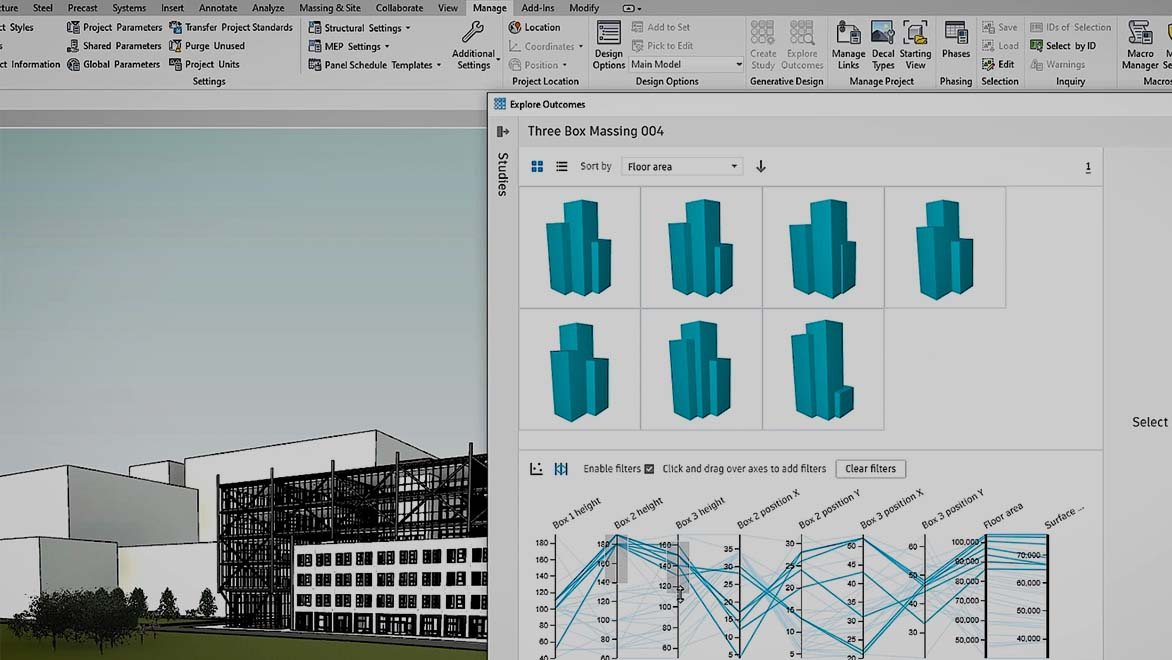
The AI model then generates and evaluates hundreds or thousands of structural permutations against them, and highlights the best-performing option. This process often produces efficient, material-saving configurations that a human wouldn't have had time to test.
For example, engineers at Arcadis used Autodesk's generative design tool to run a study of 240 truss design options at once, varying parameters like truss height, the number of divisions, and the midspan level, then compared the results to pick the most efficient configuration.
The important note here is that this software proposes options, but it doesn't validate them.
The engineer still has to check what the AI model considers the winning options against building codes, real-world conditions, and failure points that the model might not fully capture (non-linear buckling being the classic example).
Generative design widens the set of options worth considering, but determining which options are actually buildable and safe still needs to be the engineer's call.
3. Project Scheduling
Sequencing limitations are regularly to blame for infrastructure projects dragging out for years longer than projected and blowing out their budgets.
It’s part of why 56% of firms report budget overruns on more than 10% of projects. A delay in one activity cascades into everything downstream, and traditional critical-path tracking really only shows you the problem once it's already happening.
AI project scheduling tools can help avoid these blowouts, much like their design optimization counterparts help engineers find the most efficient configuration.
Rather than maintaining a single plan, an AI model can generate and test large numbers of schedule scenarios against the project's real constraints, then forecast timelines, flag where delay risk is concentrating, and optimize how work is sequenced and resources allocated.
Because the model draws on both historical project data and live conditions, it can surface risks far earlier than manual tracking, and can re-optimize when conditions change.
This digital work has a real-world impact. ALICE Technologies, one of the more established tools in this space, reports up to 17% reductions in project duration, and reductions of between 12% and 14% on labor and equipment costs.
Of course, the output is only as good as what goes in.
These tools optimize against the durations, resource availability, and dependency logic you give them. If your activity durations are guesswork or your dependencies are mislogged, the model will hand back a perfectly optimized schedule built on bad assumptions.
4. Geotechnical Prediction
Every site investigation has the same basic drawback: it only tests a few points in the ground.
Boreholes and CPT soundings tell you what’s directly beneath them, but engineers have always had to work out what's in between by hand, slowly, and always with a degree of guesswork.
Machine learning is well-suited to making those in-between estimates, reducing administrative work.
Tools like Civils.ai can build a picture of the soil layers from limited data, predict how the ground will behave, and flag risks like liquefaction or unstable slopes earlier than a manual read would. LLMs add a second angle, pulling structured data out of the free-text and scanned geotech reports where so much ground information is buried.
The evidence is promising but modest.
A 2024 study used a machine learning model across 632 boreholes and predicted soil types with about 75% accuracy. That accuracy held up even when the data was cut to a third of its size, which suggests ground conditions are consistent enough over a wide area for the approach to be genuinely useful. And where the model got it wrong, it mostly confused similar soil types, meaning it was picking up real patterns in the ground rather than noise.
At around 75%, this is helpful for an early read on a site, but doesn’t act as a replacement for proper investigation. Ground is naturally variable, and while AI speeds up interpretation, it doesn’t eliminate uncertainty, which is exactly why the engineer's judgment is still needed to make the final call.
Will AI Replace Civil Engineers?
The short answer? No.
It's unlikely that AI will entirely replace civil engineers and any near-term scenario worth worrying about. The current legal and professional structure of the field won't allow it.
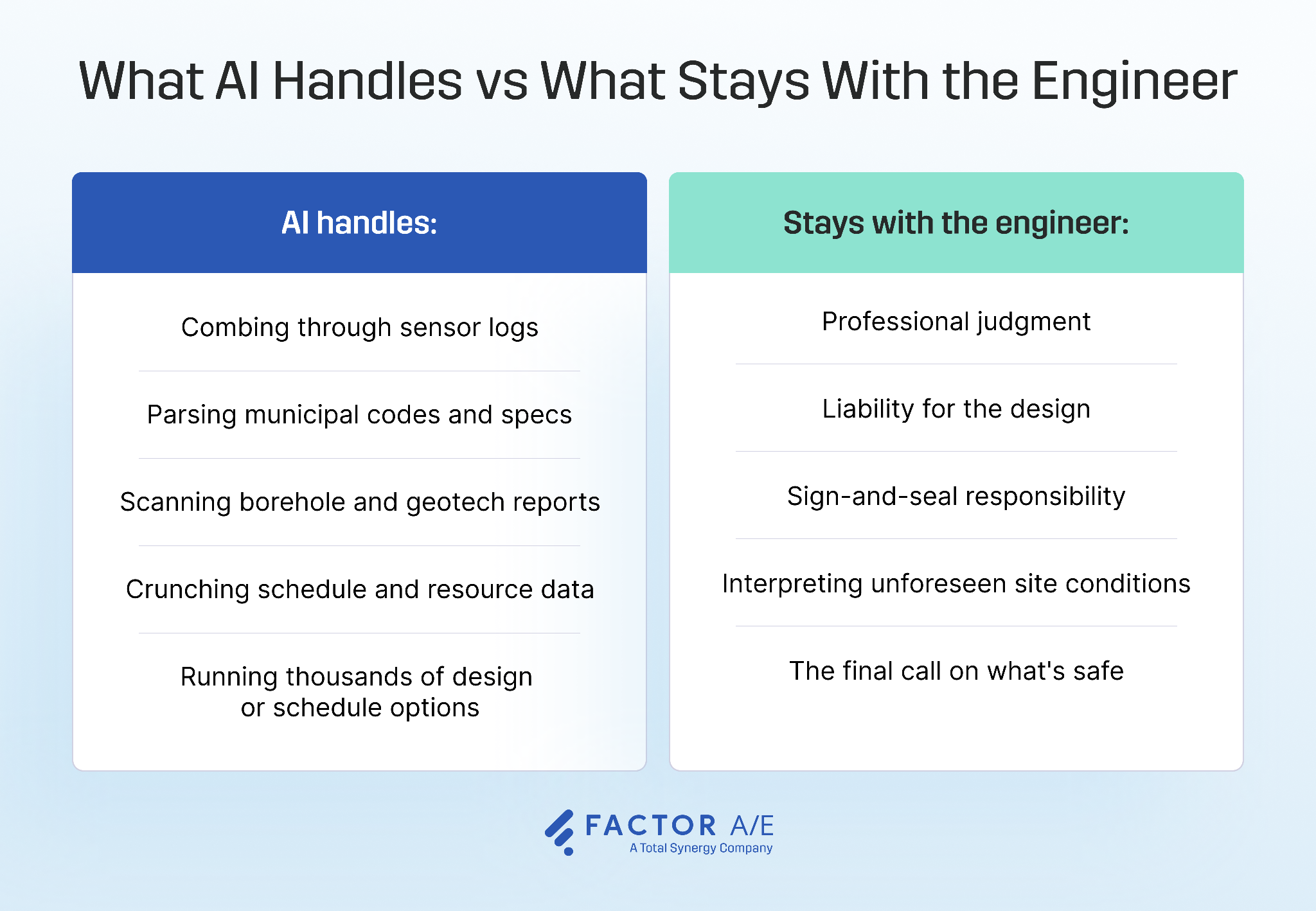
Liability, judgment, and the sign-and-seal responsibility on any drawing need to stay with a licensed engineer, and there would need to be large-scale structural and legal changes in the profession as a whole before AI could take responsibility for these tasks.
What AI really replaces is the grunt work, the hours spent combing through sensor logs, code clauses, borehole reports, and schedule data. It frees engineers to focus on the decisions only they can make, but AI does have some real limits that you’d be right to flag:
- Models hallucinate
- Any AI model is only as good as their training data
- Models trained on historical data (all of them) can't reason well about a novel failure mode the way an experienced engineer can
These limitations will be addressed as AI improves, but the legal and professional structures will be slower to move (if they change at all).
The real shift isn't replacement; it's leverage. Engineers who know how to use these tools (and where not to trust them) will outpace those who ignore them.
Making AI Work on Real Civil Engineering Projects
AI isn't replacing engineering judgment. It's giving engineers better information to apply it.
The four categories of tools discussed above are already being used on real engineering projects, but it's important to recognize that none of them work in isolation. The more these AI tools are used across a project, the more a coordination layer matters.
The shift is already visible in how firms see their own future. In Factor's 2026 A&E Industry Benchmark Report, 78% of firms said AI and automation will have the biggest impact on the industry over the coming years. As those tools spread across the work, someone still has to bring the information together.
A single project might have SHM data, a generative design model, and an AI scheduling forecast all running at once, and someone needs to pull it all into one place.
This is where project management software, the operational layer that keeps the projects (and the AI tools deployed on them) coordinated and accountable, fits. AI tools surface insight on individual tasks, but a PM platform ties those projects together so firms can see where time and money are actually going across the whole portfolio.
Factor is built for exactly this. Our project management software gives A&E firms a single place to track projects, budgets, and timelines, so as AI tools spread across the work, the people running the firm keep a clear, connected view of every project they're deployed on.
Take a guided tour of Factor with an A&E expert.

Recommended articles


See Factor in action
In one quick call, we’ll show you a simpler way to run projects and get paid faster.
.png)
“I recommend Factor to other firms. The team is great, it’s easy to use, and it has streamlined my project management. It can do the same for yours.”
Adam Mayberry
Architect / Managing Principal


