



A potential client has a new project in mind, but you have no idea if you actually have the capacity. What happened?
Someone pulls up a spreadsheet that may or may not be up to date. A few emails go out to project managers. By the time you have a confident answer, hours or even days have passed, and the client may have moved on or just be left feeling like responsiveness is not up to par.
The information exists. It's just scattered across disconnected spreadsheets, email threads, and the heads of project managers who are too busy to update a shared tracker.
That fragmentation forces a difficult choice every time an opportunity appears: commit without complete visibility and risk overloading your team, or delay your response and risk losing the work entirely.
In this guide, we'll start with the hidden costs of poor resource scheduling. Then we'll cover five scheduling methods tailored to A&E workflows, along with a step-by-step process for mastering resource scheduling.
What Poor Resource Scheduling Costs A&E Firms
The surface-level cost is easily measurable. Professional services employees spend an average of 75 minutes daily on administrative tasks, according to Timewatch research. For A&E firms, much of that time goes to answering capacity questions and resolving scheduling conflicts.
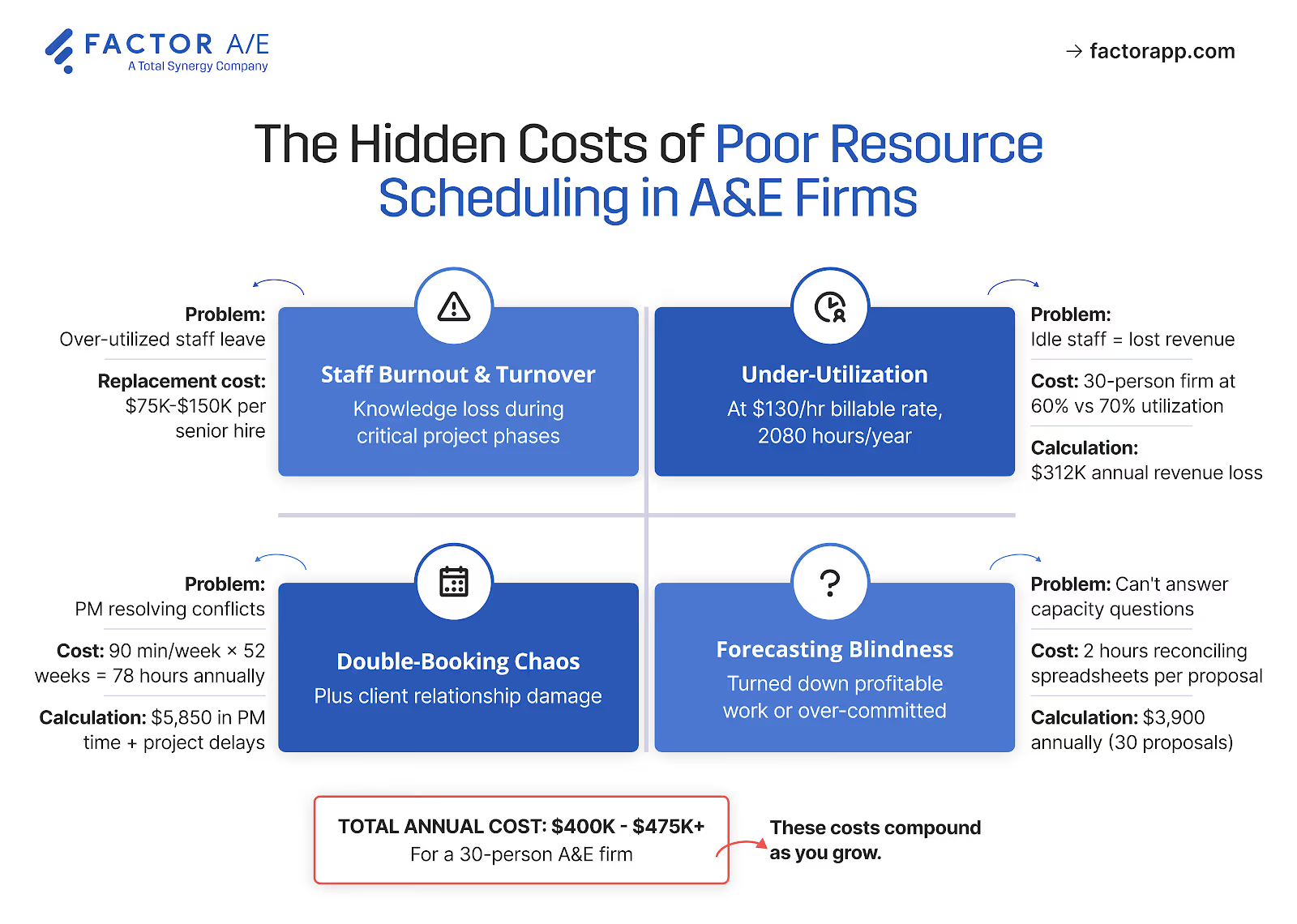
However, the costs that actually hurt don't appear on a timesheet. Here’s how each cost manifests itself:
Inefficient Resource Utilization
Without real-time visibility into assignments, you don't see allocation problems until they're crises. Your senior architect ends up scheduled for 45 hours across three projects, all with Thursday deliverables. Resolving the conflict takes 90 minutes of reshuffling and requires junior staff to take on work they weren't prepared for.
This pattern creates a cycle that's hard to break. Your senior designers work 55-hour weeks, while junior staff bill only 20 hours.
Overloaded people burn out; underutilized people generate no revenue. When conflicts finally surface, rushed reassignments compromise quality.
The financial impact accumulates through turnover, unbilled capacity, and rework. None of which show up as "resource scheduling costs" in your accounting.
Making Resource Decisions Without Data
When you can't accurately forecast capacity, every new project inquiry becomes a guessing game.
Consider a principal who receives an inquiry for a $280K healthcare project but can't confirm availability without reconciling data across multiple spreadsheets. The response takes three days instead of three hours. The project won't disappear because A&E timelines don't move that fast, but the damage is subtler.
The client notices the hesitation. A competing firm responds the same day with a clear timeline and named team members. By the time your proposal arrives, you will already be perceived as the less organized option. Worse, you've missed the window to shape the project scope while the client was still flexible.
That pattern of delayed, uncertain responses compounds over time. When you can't confidently forecast capacity, you stop trusting your own pipeline data. Hiring decisions become reactive as you bring on staff after winning projects rather than before, or carrying overhead during unexpected lulls because you didn't see the gap coming.
Proposal teams pursue projects the firm can't actually staff. And sometimes you decline work you had the capacity for, simply because the information to prove it wasn't available.
Senior Staff Trapped in Coordination
Someone has to manage all that uncertainty. When resource data is fragmented, coordination falls on principals and senior project managers.
Fusion Design, a 20-person architecture firm, documented spending 15-20 days every month on billing cycles before switching to integrated project management software. Billing is just one piece, but resource scheduling, capacity planning, and project tracking create similar burdens, and in most firms, that work falls to senior staff rather than administrators.
The opportunity cost compounds quietly. Strategic planning gets deferred, and client development suffers. Your most expensive talent ends up being data managers rather than firm leaders.
5 Resource Scheduling Methods for A&E Workflows
Generic project management advice rarely fits A&E workflows. You're not managing a software sprint with predictable two-week cycles. You're managing multiple concurrent projects, each moving through distinct phases with different skill requirements and timeline pressures.
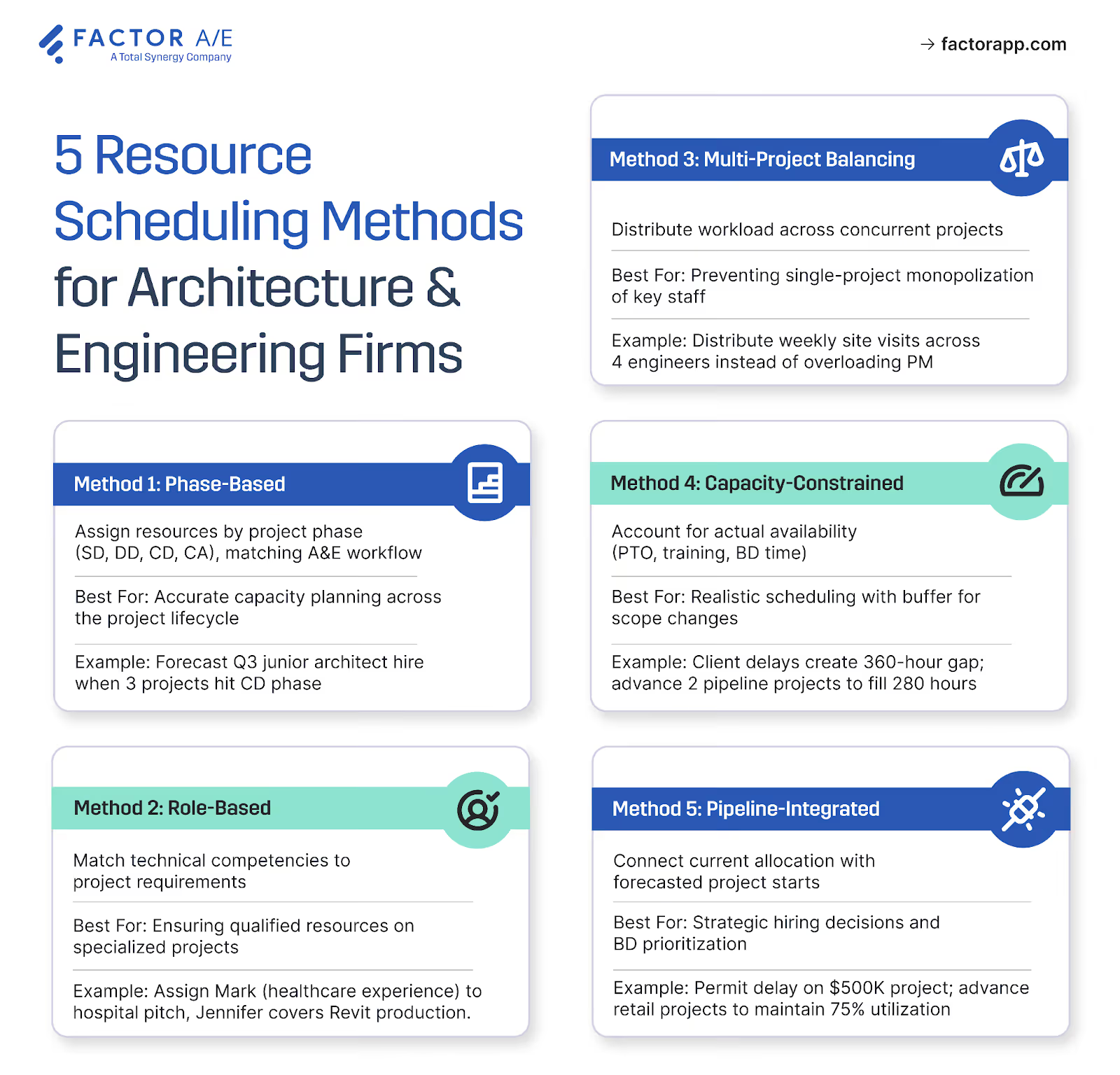
These five approaches address that reality:
1. Phase-Based Resource Scheduling
Remember the Monday morning discovery that a senior architect is scheduled for 45 hours across three projects? That crisis typically stems from the exact root cause: assigning people to projects without considering how resource needs evolve as work progresses.
Schematic design may require 60% of a senior architect's time for conceptual direction. Construction documents need 30% senior oversight and 70% production capacity.
Firms that allocate resources by phase instead of fixed time blocks can anticipate these shifts. When three projects hit construction documents simultaneously, the production bottleneck becomes visible weeks ahead, not the Thursday before deliverables are due.
The difference is enough lead time to hire, negotiate deadlines, or redistribute work before anyone ends up being scheduled for a 55-hour week.
2. Role-Based Resource Allocation
When a senior architect spends 15 hours on routine production work that a junior team member could handle, the margin impact doesn't show up until the project closes. By then, it's too late to fix.
This occurs when assignments default to calendar availability rather than the most suitable availability. The person who is listed as "free" receives the work, regardless of whether their expertise justifies their billing rate.
The impact is measurable. According to SPI Research, high-performing professional services organizations generate 31% more annual revenue per billable consultant than average firms, largely because they match skills to assignments rather than defaulting to whoever appears available.
Firms that redirect specialists to high-value work and protect junior staff time for production see the difference in their project margins, not just their utilization reports.
It requires knowing not only who's available, but also what each person should be working on, given their rate and expertise.
3. Capacity-Constrained Scheduling
Most utilization planning assumes a theoretical capacity of 40 hours per person per week, fully available. But reality includes PTO, training, business development, and the inevitable scope changes that consume buffer time.
Firms that schedule against actual available hours make commitments they can keep. They build in buffers for the realities of A&E work rather than treating every variance as a crisis.
When a project delay suddenly frees up 360 hours across three team members, these firms pull forward pipeline work rather than let billable capacity sit idle. That flexibility comes from knowing what's realistic, not what's theoretically possible.
4. Multi-Project Resource Balancing
Deadline collisions are inevitable when you're running 50+ concurrent projects. The question is whether you see them early enough to respond thoughtfully or discover them when three project managers show up at the same senior designer's desk on Wednesday afternoon.
Balancing workloads across concurrent projects requires visibility into all active assignments at once. Spreadsheets make this nearly impossible at scale. But firms that achieve it report something specific: coordination meetings drop from weekly to biweekly because the conflicts that used to dominate them are resolved before they escalate.
That's hours returned to billable work every month and less friction for everyone involved.
5. Pipeline-Integrated Resource Planning
The forecasting gap we discussed earlier: reactive hiring, pursuing projects you can't staff, and declining work you had capacity for, stems from treating current resource allocation and future pipeline as separate concerns.
Firms that link resource scheduling directly to forecasted project starts can see capacity constraints before they become staffing emergencies. As utilization increases, they become more selective about which proposals to pursue. Hiring conversations start before they're scrambling to staff projects that have already been won.
This forward visibility transforms capacity planning from a guessing game into a strategic advantage. When a prospective client asks about availability, the answer comes in minutes, with confidence.
A Step-by-Step Process A&E Firms Can Follow to Master Resource Scheduling
Understanding these scheduling approaches is one thing. Implementing them while three projects are in construction documents, two more are kicking off, and your senior designers are already at capacity, is another.

Here's how firms move from reactive coordination to systematic resource planning.
Step 1: Audit your current resource allocation process.
41% of firms don't track realization or aren't sure if they do. That uncertainty usually starts with assignments. The official process might be "PMs coordinate with department heads," but the reality is often email threads, hallway conversations, and project managers keeping mental lists of who's available.
Before making any changes, document the current workflow. Who makes assignment decisions? What information do they have when they make them: a spreadsheet, a whiteboard, or memory?
Where do conflicts surface, and how late in the process do they appear? Firms that skip this step tend to layer new tools onto broken workflows, which just worsens the dysfunction.
Step 2: Define your resource scheduling requirements.
Firms that outgrow spreadsheets often reach for whatever project management software seems popular, only to discover it doesn't fit. Generic tools that are not industry-specific often fail to accommodate phase-based billing, subconsultant management, or the actual progression of A&E projects through milestones.
Before evaluating platforms, audit what you actually need: real-time capacity views, role-based allocation, and integration with your accounting system.
Growth trajectory matters too. A 15-person single-office firm has different requirements than one planning a second location. The firms that avoid painful re-implementations later choose tools that handle A&E workflows natively, rather than relying on workarounds that break as volume increases.
Step 3: Choose the right resource scheduling platform.
Evaluate platforms against your specific requirements. Can they track resources by project phase rather than generic tasks? Do they handle role-based assignments so you can match work to qualified staff rather than to whoever happens to be available? Can they provide real-time visibility into capacity across concurrent projects? Will your resource data be connected to the rest of your project data?
Integration with your accounting system is critical. Resource data should flow into financial reporting without manual transfers. A&E-specific platforms, such as Factor AE, display both billable rates and actual pay rates for internal staff, enabling you to assess profitability as projects progress.
The platform also helps you avoid scheduling 500 hours on a 400-hour project by showing total allocated hours against your budget.
When employees log time against their scheduled assignments, the actual time is captured and flows directly into invoice preparation, eliminating double entry and reducing billing errors.
Step 4: Migrate your data and train your team.
Firms achieve their best results when their system accurately reflects how projects are scoped, staffed, and delivered in practice, rather than when teams are forced to adapt their work to generic project management software.
Purpose-built A&E firm management software assumes best practices in its design, so it provides a stronger foundation than trying to configure everything from scratch.
Data migration typically focuses on transferring financial and operational actuals to date, including budgets, invoiced amounts, and employee labor. This provides project managers and firm leaders with immediate visibility into current performance, eliminating the need to recreate historical plans or schedules. The goal is to establish a reliable starting point that supports informed decision-making going forward, rather than relying on past experiences.
As you transition, you need to be thoughtful about when and how you introduce resource scheduling. Scheduling works best when all active projects are represented, since partial schedules can create an incomplete or misleading view of individual workloads.
For many firms, this means defining project structures, roles, and staffing expectations first, then utilizing scheduling to manage capacity across the entire portfolio, rather than as a limited pilot.
Training should reinforce alignment between the system and how your firm actually operates. Instead of teaching features in isolation, practical training focuses on real project scenarios, helping teams understand how tasks, time, budgets, and staffing connect in day-to-day work.
When the team can see how the new platform supports their existing responsibilities, adoption happens faster and with less friction.
Step 5: Monitor and optimize your resource allocation.
Once your system is live, comparing scheduled hours against actual time spent reveals patterns that spreadsheets hid for years. Where do estimates consistently miss? Which project types or phases run over?
Firms that track this data find their forecasting accuracy improves within two or three project cycles.
When a PM sees that construction documentation on mid-rise residential consistently runs 20% over schedule, the next estimate accounts for that. When leadership notices that projects with new clients take longer in schematic design, proposals begin to reflect that reality. Tracking actuals against estimates turns every completed project into calibration data for the next one.
Utilization trends inform hiring decisions before capacity becomes a crisis. The firms that avoid both burnout and bench time typically target 70–80% utilization, leaving buffer for the scope changes, client revisions, and unexpected site conditions that define A&E work.
When leadership can see capacity gaps forming three months in advance, hiring conversations occur with concrete pipeline data rather than relying on gut feel.
Making Resource Decisions Based On Data, Not Guesswork
The firms that implement systematic resource scheduling don't just reduce Monday morning conflicts. They change how decisions get made.
When leadership can see capacity three months out instead of scrambling week to week, hiring conversations shift from reactive to strategic. When PMs know who's actually available before committing to timelines, proposals become more accurate and profitable. When senior staff aren't constantly pulled into firefighting assignments, they stay on the complex work that justifies their rates.
None of this happens overnight. The transition requires discipline: documenting current workflows, establishing centralized visibility, creating a consistent process, and utilizing the data to refine over time.
But firms that make the investment stop losing margin to invisible inefficiencies and stop losing talent to preventable burnout.
Factor AE offers resource scheduling solutions tailored for architecture and engineering firm workflows. Request a demo to see how the platform handles phase-based planning, real-time capacity tracking, and QuickBooks integration.

Recommended articles

See Factor in action
In one quick call, we’ll show you a simpler way to run projects and get paid faster.
.png)
“I recommend Factor to other firms. The team is great, it’s easy to use, and it has streamlined my project management. It can do the same for yours.”
Adam Mayberry
Architect / Managing Principal


