



You've seen a team deliver projects flawlessly one month, then scramble the next. The difference usually isn't talent. It's that the process held together last time and didn't this time.
When project decisions are hidden in email threads, tribal knowledge resides in someone's head, and when three people update the same spreadsheet differently, every project becomes a reinvention. Budget numbers exist in multiple places. Client feedback vanishes between phases. The six-week project dragged on for ten.
The industry data confirms what you're feeling: architecture firm billings have declined in 28 of the last 31 months, and profit margins have squeezed to 2% at many practices. When the cushion is already gone, every inefficiency compounds.
The fix isn't working harder. It's building a process where the right information lives in the right place and handoffs don't require a 45-minute sync call. What follows is a framework built around how A&E firms actually operate: phase-based billing, design iterations, consultant coordination, and client approvals.
What is the project management process?
Most project management advice assumes you're shipping software or managing a construction crew. It doesn't account for the reality of A&E work: design phases that overlap, clients who need to approve before you can move forward, and consultants operating on timelines different from those of your team.
At its core, the project management process is a systematic approach to planning, executing, and controlling projects. However, for A&E firms, the standard five phases (initiation, planning, execution, monitoring, closure) need to reflect how your work actually moves.
In A&E firms, this means tracking progress by design phase rather than arbitrary milestones. Budgets get structured around schematic design, design development, and construction documents.
Client approvals gate each phase, and project managers coordinate across architects, structural engineers, MEP consultants, and specialists throughout.
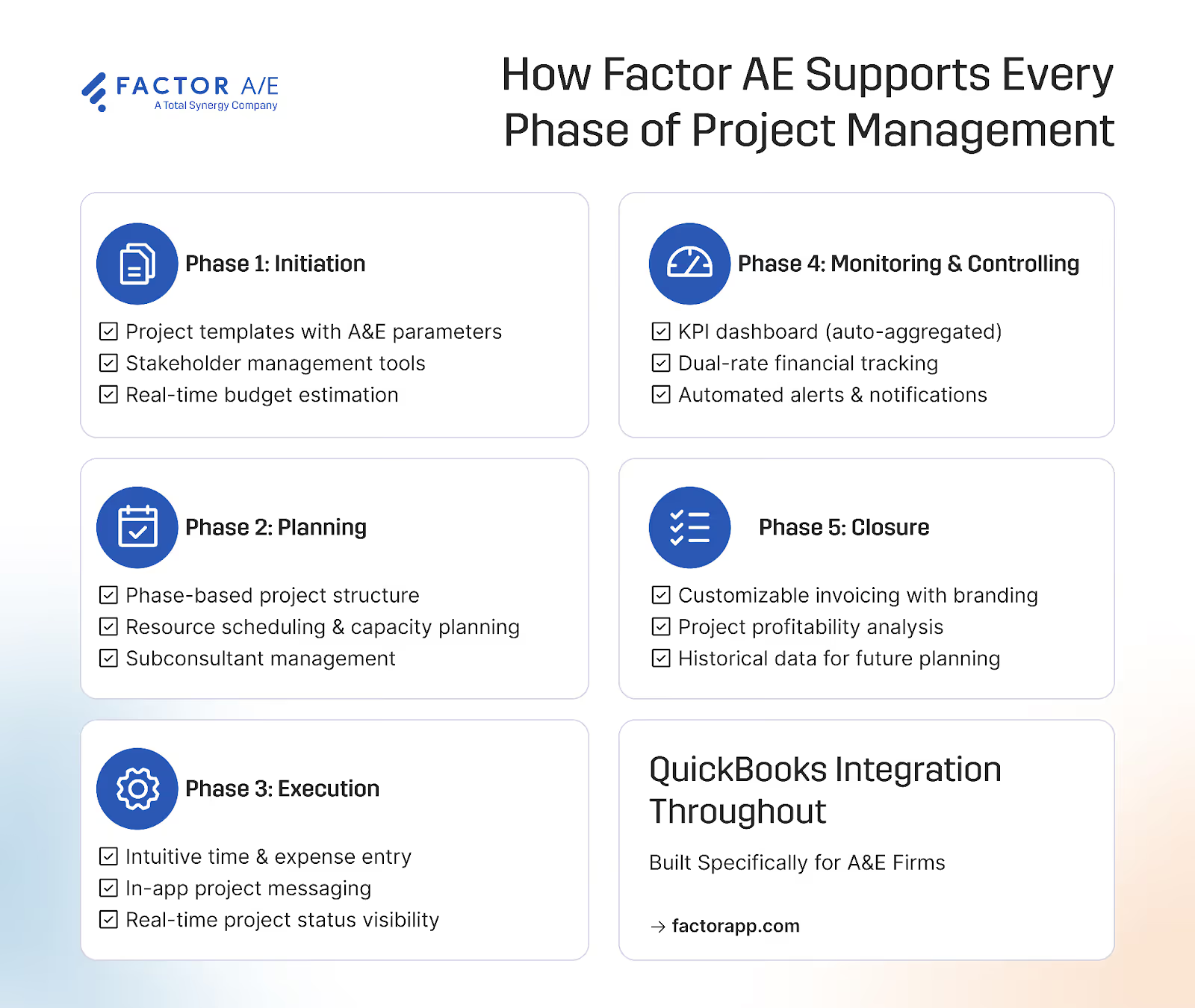
The 5 Core Phases of Project Management for A&E Firms
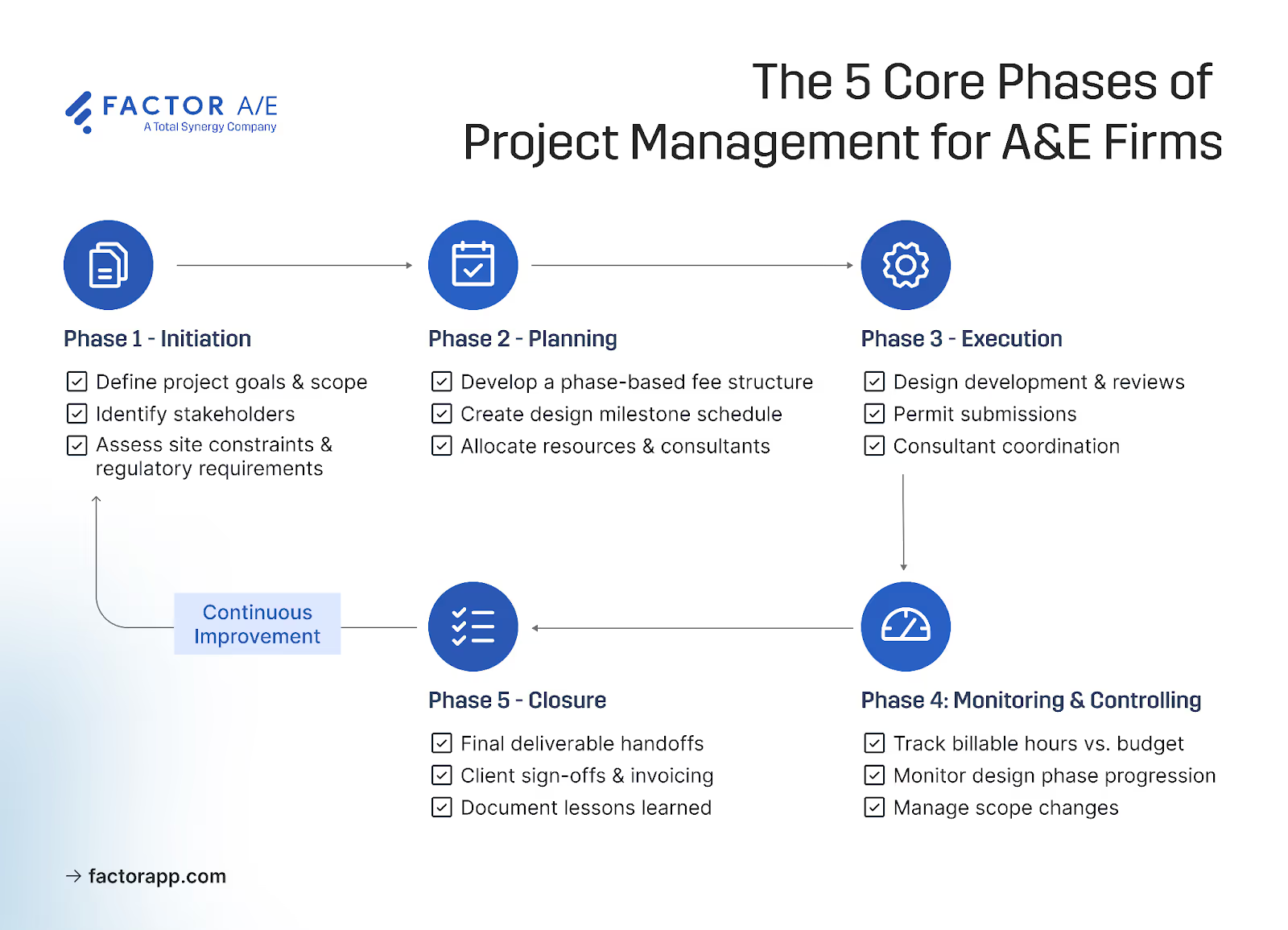
These five phases form the backbone of any project. But the version in a PMP textbook assumes predictable, linear progress. A&E work doesn't move that way.
Design coordination involves three disciplines working on the same deliverable. Consultant dependencies mean your timeline isn't entirely yours to control. Client approval cycles can reshape weeks of planning in a single meeting.
Each phase below is built around those realities, not the sanitized version where everything goes according to plan.
Phase 1: Project Initiation
You've taken on projects where the scope was clear to one person and murky to everyone else. The client thought they were getting X, your team planned for Y, and by DD, you're negotiating what was actually agreed to.
Initiation is where you prevent that. Before timelines or budgets, you're aligning on what the project actually is: scope boundaries, key deliverables by phase, client expectations, and the consultants you'll need to coordinate with.
This isn't just a kickoff meeting. It's documenting what "done" looks like at SD, DD, and CD, so when the client asks for something outside that boundary, you have a reference point instead of a drawn-out negotiation.
When a client requests "one more revision" in DD, you can point to the agreed scope document and have a conversation about change orders, not an argument about what was included.
Phase 2: Project Planning
You've probably started a project with optimistic timelines that assumed everything would go right: approvals on schedule, consultants delivering on time, no permit delays. Then reality hit.
Planning is where you center everything in real terms. Budgets are structured around SD, DD, and CD, not a single lump sum that hides where you're actually burning hours.
Schedules that account for approval cycles you can't control. Consultant coordination was mapped early because discovering clashes at the CD stage costs 10 times as much as catching them at the SD stage.
The deliverables here are a work breakdown structure, a phase-based budget, and a realistic schedule, not paperwork. They're how you answer "where are we?" without scrambling.
Three weeks into SD, you can see you're at 60% of the phase budget with 40% of the work done. That's a conversation now, not a surprise at invoicing.
Phase 3: Project Execution
Execution is where plans meet reality. It's also where gaps in your process show up.
At this stage, you’re handling design development, client review cycles, permit submissions, and construction documents. Each handoff is a place where things go wrong.
You've probably lived this: the structural engineer works from Tuesday's markup, the architect sent a revision on Wednesday, and the beam locations don't align with the mechanical layout. No one catches it until the contractor calls three weeks later. The revision existed, but the communication didn't.
This is why execution isn't just "do the work." You need a system that:
- Captures design revisions in real-time instead of reconstructing them from email threads a week later
- Syncs feedback across teams before the next discipline picks up the file
- Lets anyone answer "what version is current?" without digging
The goal isn't perfection. Revisions happen. Clients change direction. The goal is catching misalignment in hours, not weeks.
Phase 4: Monitoring and Controlling
Monitoring runs parallel to execution. It tells you whether the plan is holding or whether you're three weeks from a problem that's already baked in.
You're tracking:
- Timelines against phase dates: Will DD actually wrap before the client presentation, or are you about to ask for an extension?
- Budget by phase, not just total: SD might look fine overall, while DD is already 30% over. If you only watch the total, you won't see it in time.
- Consultant spends against agreements: That subconsultant invoice is coming in 40% higher than expected? That's a monitoring failure, not a billing surprise.
Firms that stay ahead use dashboards that display this information in real-time. They don't wait until Friday afternoon to issue reports after the damage is done. Weekly check-ins catch drift early
The small win: When a phase hits 80% of the budget, you know that day. Not at invoice time. That's the difference between a conversation and a crisis.
Phase 5: Project Closure
Closure doesn't mean "we're done." It means completing final deliverables, obtaining stakeholder sign-offs, and capturing what you've learned before everyone moves on.
This phase includes final invoicing, contract closure, team debriefing, and archiving project materials.
Your projects don't end at substantial completion. Warranty periods, post-occupancy evaluations, and record drawings extend closure by months and require continued coordination.
Most firms rush this. It costs them:
- Invoices left hanging: The final 10% of the fee you never collect because no one followed through
- Lessons evaporating: The same estimating mistake shows up on the next project because no one documented what went wrong
- Legal exposure: Contracts still technically open, liability periods never clarified
After this phase, you should have: a final invoice out the door, contracts formally closed, lessons documented in a location where the next project team can find them, and materials archived for the warranty period ahead.
Firms that treat closure as a real phase recover revenue, reduce repeat mistakes, and protect themselves. This is where tools that tie invoicing directly to project phases pay off: no reconciliation, no chasing, no "wait, did we bill for that?"
Common Project Management Process Mistakes in A&E Firms
Most project management failures don't stem from not knowing what to do. You know time entry should happen daily. You also see that the spreadsheet workaround isn't sustainable.
The failures stem from systems that work against you: tools that assume linear workflows, processes that add friction, and disconnects between daily tasks and business outcomes.
The SPI Professional Services Maturity Benchmark reveals the associated costs. In 2024, billable utilization fell to 68.9%, below the 75% threshold at which margins remain healthy. On-time delivery dropped from 80% to 73% over a three-year period. These aren't talent problems but system problems.
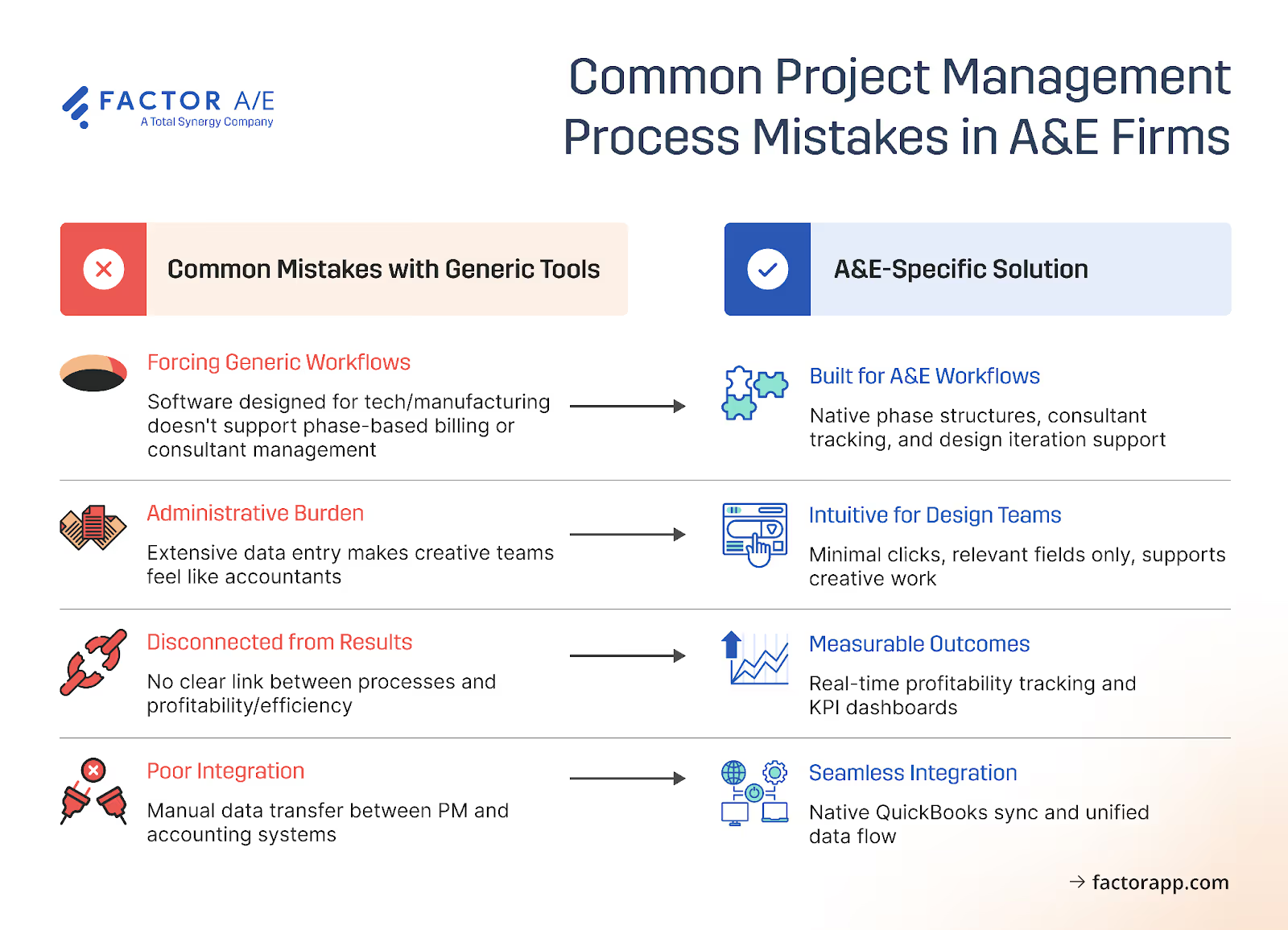
Here are four patterns that sabotage projects:
1. Trying to force generic tools onto A&E workflows.
Tools like Asana and Monday.com assume linear workflows where task lists move from start to finish. A&E projects don't operate that way.
Your work moves through phases: SD, DD, CD. However, generic PM tools treat each phase as a container for discrete tasks that you complete and then move on from. The truth for A&E firms is that in each phase, you're iterating on client feedback and consultant input.
Phases bleed into each other because DD starts before SD is complete, and CD surfaces issues that send you back to DD decisions. Billing ties to phases rather than milestones.
Subconsultant coordination means tracking agreements and payments across multiple firms. None of that maps to a checklist.
When the tool doesn't fit, you create custom fields nobody maintains, or keep spreadsheets on the side for the work the system can't handle. Project data is scattered across systems, slowing everything downstream.
Fusion Design experienced billing cycles that stretched to 20 days when using a legacy platform. After switching to Factor, invoicing dropped to four hours.
If you're maintaining a spreadsheet alongside your PM tool, the tool isn't working for your workflow.
2. Overwhelming your team with an administrative burden.
Those spreadsheet workarounds exist because the tool fights you at every step. When logging an hour requires five clicks, entering an expense involves three screens, and updating project status involves filling out multiple fields, the system creates more work than it saves.
Research shows 22% of employees lose four hours per week searching for files and specifications. When you're managing documentation across design phases, consultants, and approval chains, that friction compounds.
Systems that require designers and engineers to spend more time on administration than on billable work don't get used.
Time entries pile up until Friday. Budget tracking moves back to spreadsheets. Project status becomes whatever someone remembers from the last meeting.
Feature depth doesn't compensate for friction in daily use. The standard should be time entry in seconds, status updates with minimal clicks, and interfaces that are simple enough so that nobody needs in-depth training just to log hours.
3. Failing to connect processes to business outcomes.
Say you find a tool where time entry takes seconds and status updates require only a few clicks. The administrative burden is gone. But where does all that data go?
Time tracking exists so invoices can go out. Status updates exist so meetings have something to report and everyone understands progress at-a-glance. The contract requires phase tracking, but that alone doesn't tell you whether the project will make money.
Connected processes link daily work to business results. When a designer logs time, that entry should affect project profitability in the same view. When a PM updates phase status, the budget impact should be visible immediately. When scheduling resources across projects, you should consider margin implications in addition to calendar conflicts.
Let’s say a firm redesigns its status process around three questions: Are we on budget? Are we on schedule? What needs to change? That means meetings go from 45 minutes of updates to 15 minutes of decisions, as the data is already visible during project work.
4. Ignoring integration with existing business systems.
Project managers log time in one system. Accountants re-enter it for invoicing. Then, subconsultant payments get tracked in spreadsheets because the PM tool can't handle three-way agreements. Each re-entry point introduces errors and takes time.
For many small to medium-sized A&E firms, QuickBooks handles accounting. If your PM system can't push time entries, project budgets, and invoices directly to QuickBooks, you're building a reconciliation problem that compounds monthly. Research shows that manual data reconciliation costs growing businesses an average of 25 hours per week, time that should be allocated toward billable work.
CSV exports aren't integration. Someone has to export, verify the formatting in Excel, and then import it to QuickBooks. Each step introduces error potential. A native QuickBooks integration pushes data automatically and flags discrepancies before they become reconciliation problems.
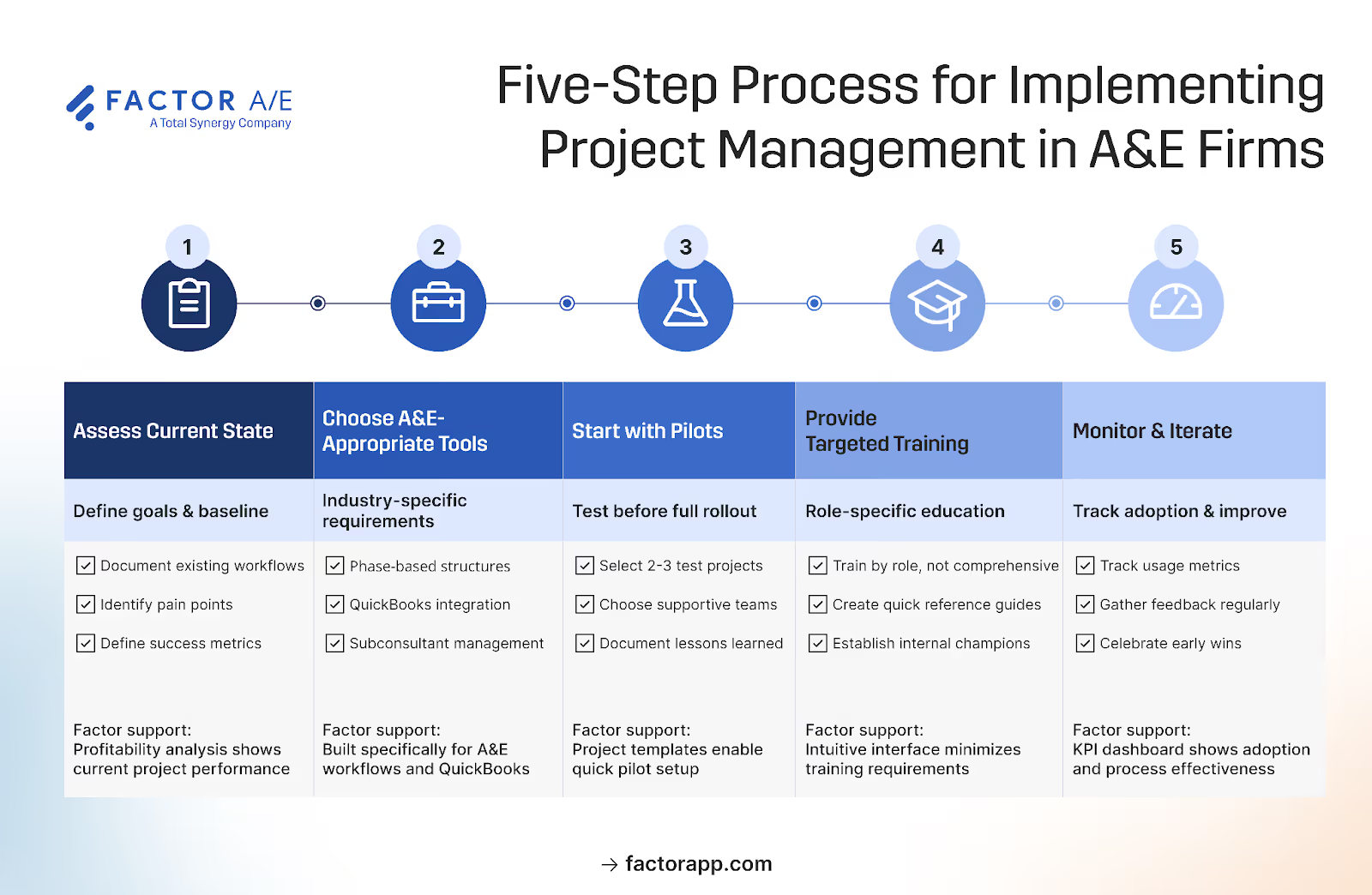
Implementing Project Management Processes: A step-by-step Approach
Avoiding these four mistakes we’ve covered starts with a process grounded in how your firm actually operates.
That means understanding where handoffs break down, where information gets lost, and where billing or coordination slows delivery. Document that reality before adopting a new system.
Step 1: Assess current state and define goals.
How long does monthly invoicing actually take? How often do projects go over budget before anyone notices? Where do team members currently track their time: spreadsheets, email, or memory?
Name the pain points causing the most friction: missed deadlines, billing delays, unclear project status, and subconsultant payment confusion. These serve as your benchmarks for determining whether a new system is actually working.
Define success as "reduce invoicing time from 15 days to 3 days" or "know project budget status without asking accounting" rather than vague goals like "better project management." Specific metrics prove ROI when leadership asks about the new system.
Process changes require sustained effort. When leadership champions the change visibly, teams follow. Without that commitment, even well-designed systems get abandoned.
After completing this step, you should have a written list of current pain points, along with rough time and cost estimates, as well as 2-3 specific metrics to measure improvement.
Step 2: Choose industry-appropriate tools.
Generic platforms fail to meet the needs of A&E firms: phase-based billing with SD, DD, and CD as separate budget containers, subconsultant payment tracking without the need for spreadsheets, and dual-rate accounting that displays both billable rates and actual costs.
Three questions to test any platform:
- Can you set up phase-based budgets with separate service and expense tracking for each design stage?
- Does QuickBooks integration sync bidirectionally without CSV exports?
- Is the interface intuitive, or does it seem like it might require weeks of training for your team to get comfortable with basic tasks like logging time?
Factor AE's phase-based structure ensures that budgets, billing, and tracking align with how SD, DD, and CD workflows actually operate, rather than forcing phases into task lists.
Our QuickBooks integration syncs bidirectionally, so new projects and invoices flow to accounting without manual exports. Time entry takes seconds, which means it actually gets done daily instead of piling up until Friday.
Step 3: Start with pilot projects.
Pick 2-3 projects that mirror your typical work: different clients, varying sizes, and a mix of team experience levels. Choose early adopters who will provide honest feedback, as their experience becomes the case study that skeptics trust.
As you complete this step, trialing projects in your new system should give you a good idea if you’re headed in the right direction.
Even at this point, increased resource visibility and capacity awareness can reveal issues such as overallocation before it causes problems. If early workload views indicate a principal split across multiple active projects simultaneously, you can adjust assignments before deadlines start to slip and handoffs become rushed.
Step 4: Train for outcomes, not features.
Training fails when it focuses on software features instead of workflow improvements. Explaining how to log time matters less than explaining that logging time here automatically means billable hours show up in project profitability reports.
Run 15-minute weekly check-ins during the first month and ask three questions: What's working better than the old way? What's frustrating? What one change would make this easier?
Track actual usage through submitting timesheets, timelines, and updating complete percentages, rather than vague assurances in meetings. When someone isn't using the system, find out why. A confusing interface, unclear value, and a workaround that feels faster each need different fixes.
After completing this step, you should have usage patterns showing who's engaged and who needs support, with specific friction points identified.
Step 5: Measure results and iterate.
Compare your benchmarks from the first step to your current performance: how long invoicing takes, how quickly you can view budget status, and how much time is spent chasing project updates.
Factor's dashboards display project health in real-time, eliminating the need for manual reports. When a project hits 80% of the budget, both the PM and principal see it immediately and can have a conversation before the project goes over.
Core Architecture hit 100% user adoption within weeks. Project managers could set up projects and run invoices themselves without waiting for accounting. The tool matched their workflow instead of requiring them to change how they worked.
After completing this step, you should have documented improvements against your original benchmarks, with data to share with leadership and the rest of the firm.
Build a Project Management Process Your Team Will Actually Use
A&E firms run on thin margins and tight timelines. When projects slip, or budgets drift, there's no cushion. The difference between a profitable year and a difficult one often comes down to whether small inefficiencies compound or get caught early.
You know the patterns: the spreadsheet that tracks what the PM tool can't, the invoice that takes two weeks instead of two hours, the budget conversation that happens at close-out instead of week three. None of it seems like much until you add it up across a year of projects.
We’ve discussed the sources of those inefficiencies and shared a five-phase framework to help you address them. Factor AE gives you a system built around how that structure actually works in A&E firms.
Schedule a demo to see how it handles your workflows.

Recommended articles

.avif)

See Factor in action
In one quick call, we’ll show you a simpler way to run projects and get paid faster.
.png)
“I recommend Factor to other firms. The team is great, it’s easy to use, and it has streamlined my project management. It can do the same for yours.”
Adam Mayberry
Architect / Managing Principal


